Hire the right person, fast.
No resumes, no phone screening, no no-shows
Post a visual job ad, put a QR poster in your window and meet applicants before you interview. AI Recruiter, screening questions, QR and social sourcing, and chat, all in one app.
No credit card · Talent in secondsTrusted by top businesses like you.
Supermarkets · Hospitality · Retail · Bars & Restaurants · Breweries · Franchises · Automotive · Event Staffing · Recruitment · Trades · Healthcare · and more


How it works
Post. Screen. Hire.
1Post
Create a visual job ad and an in-store QR poster in minutes, or invite candidates you already have.
- Free job ad, careers page and business listing
- Print a QR poster for your window, counter or van
- Share to socials, Google Jobs and Indeed

2Screen
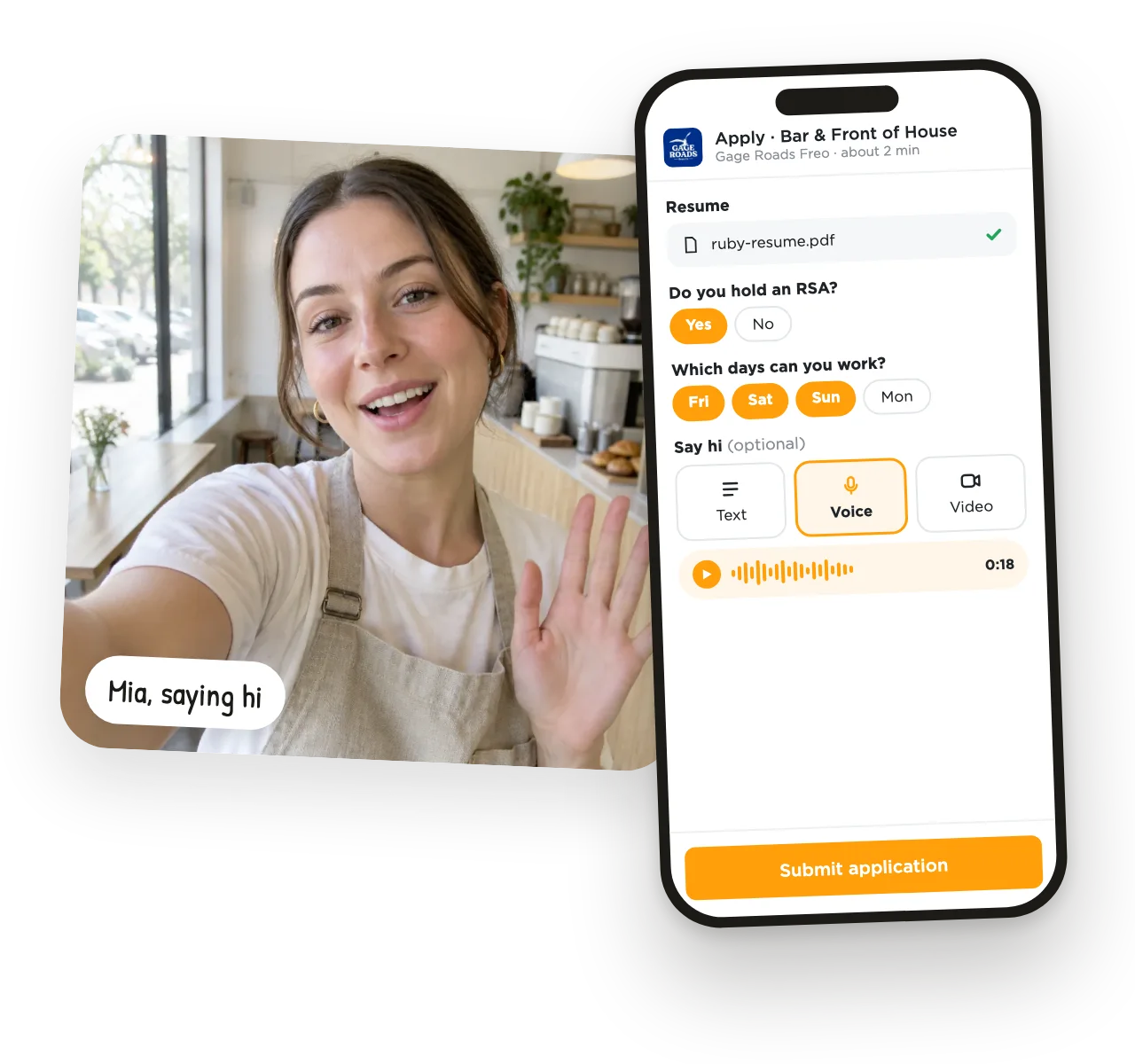
Use your gut instinct. Applicants answer your screening questions and can say hi by video or voice, and AI Recruiter helps rank the best fits.
- Resume, answers and hello on one card
- Video is optional, you choose per job
- AI Recruiter scores applicants against your ad
3Hire
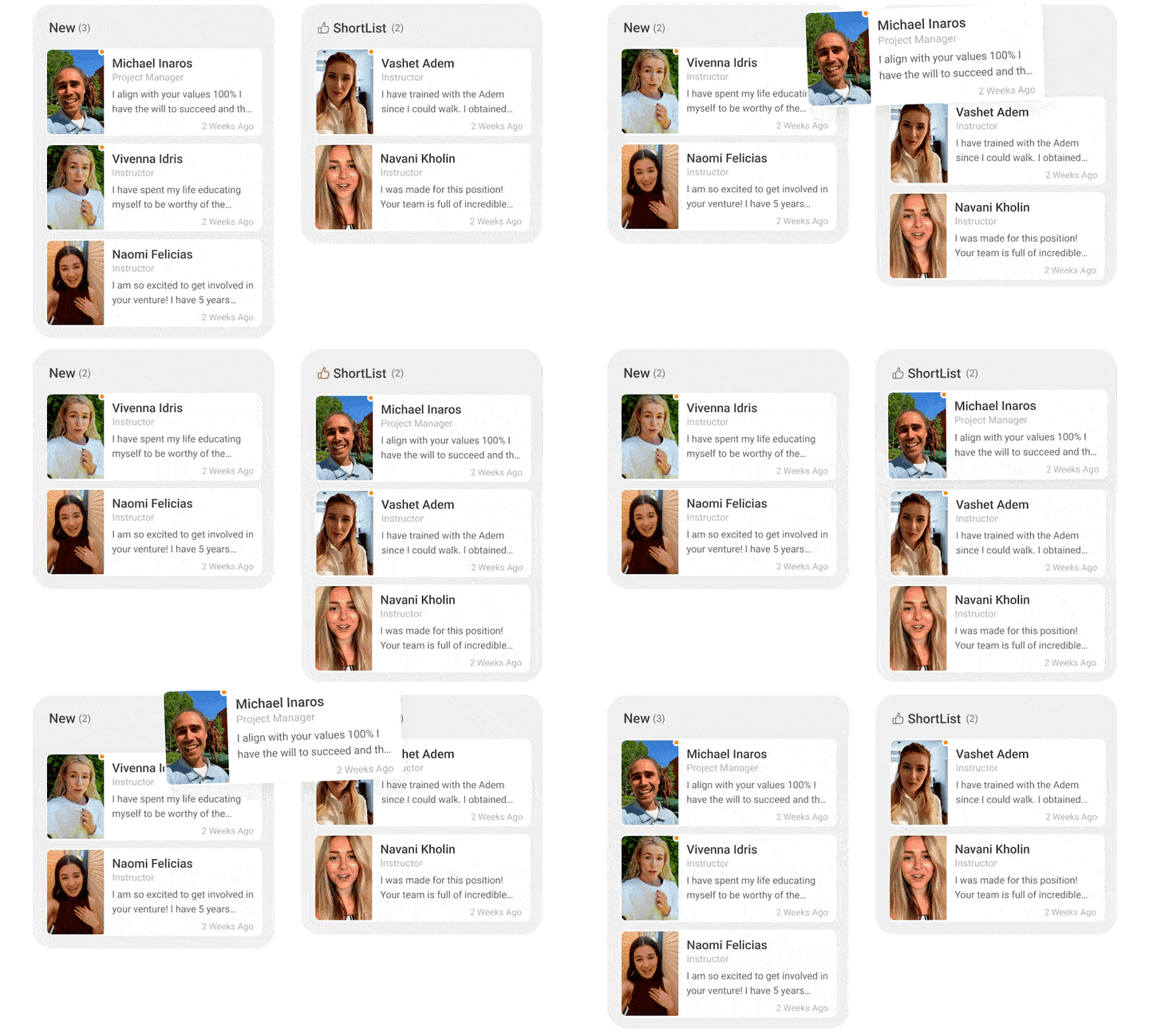
Manage your candidates visually. Seeing is believing: drag, drop, sort, make notes, chat, interview and hire.
- Shortlist with a thumbs up
- Private notes and team sharing
- Chat and broadcast without leaving UseVerb
Outcomes
Cut time-to-hire from weeks to hours.
Skip resume reviews and phone screening, and get fewer no-shows with chat.
- 5 minInstall time
- 10xMore quality applications
- 95%Faster hiring process
“A store owner told us he saves 20 hours a month in reduced resume screening, calling people, meeting the wrong people and dealing with no-show interviews.”
What business owners say.

“The value I get at UseVerb is definitely being able to see the person, whether it's on the app or on my tablet, and not having to go through all the resumes and pieces of paper.”
Hofmann · Liquor ShedRetail & Hospitality
“Easy to navigate, easy to set up, just adds a different dimension to recruiting. And it just adds something beyond just a CV or cover letter.”
Ben · Lakeside Recreation CentreSports & Recreation
“It's an absolute game changer going away from paper-based stuff. Allows the process of hiring to be a lot quicker.”
Jason · SpecsaversHealthcare & RetailWhy switch?
The old way of hiring doesn't work anymore.
- Value firstWe earn the right to serve you by delivering upfront.
- More members, more valueMore job seekers, more jobs, more great hires.
- Hire for attitude & experienceMeet the person, not just the paper.
UseVerb works. A fresh new way to hire.
Small business? Use UseVerb for free.
Candidate screening, QR codes, a business listing and job ads, free.
Start freeBig business? We'll help.
Value professional support? Business integration packs, setup and training are available.
Book a demo
World-class support
Real people, ready to help.
With world-class support and training, our expert team will make sure you succeed, from your first job ad to your hundredth hire.
Frequently asked questions
Quick answers about hiring with UseVerb.
What do you mean, AI Antidote?
Quick Apply and AI-written resumes mean piles of low-effort applications from people who may not even want your job. UseVerb is the antidote: candidate screening that shows you who's really applying, with authentic intros, screening questions and AI Recruiter, so you can make fast, accurate and informed hiring choices.
I'm too busy for this?
That's why UseVerb is perfect. Setup takes minutes: post a job, print a hiring poster and start screening straight away. Swipe through applicants between customers, focus only on high-intent people, and never waste time at a bad interview again.
Why pay for UseVerb when there are free job boards?
Job boards find you candidates; UseVerb spots you talent. Boards bring traffic, and UseVerb helps you screen and manage everyone who applies, so you skip hours of resumes and bad interviews. The free version is packed with value, and you only upgrade when you value the extras.
Are QR codes just a silly trick?
No. Print a UseVerb QR hiring poster for your window, counter or van and locals can scan and apply on the spot, with no long links to type. It brings in applicants who are close by and ready to work, and saves on advertising.
Can't I just use my email and phone number?
You could, but it gets messy fast: inboxes fill with unqualified applicants and phone screening eats your day. UseVerb puts every applicant, their answers and your notes in one place, with chat built in.
Will UseVerb work with my other HR tools?
Yes. Use UseVerb on its own or alongside the tools you already have. Your jobs can be shared to Google Jobs and Indeed, and you can export your applicants to CSV at any time.
Is UseVerb hard to learn?
Not at all. There's nothing to install unless you want the app. Log in, post a job, build a careers page, print a hiring poster and add your managers. There are guide videos and AI help in WorkChat if you get stuck.
Can I cancel at any time?
Yes. Open Settings, click Go Premium and unsubscribe. You keep Premium until the end of the period you've paid for, and the applications you've received stay.
Great staff can make or break a business.
Join thousands of businesses that use UseVerb to hire.
No credit card · Talent in seconds